One menu, both prices
Aimbot, player ESP, loot ESP, chams, and misc are in the same build. Monthly is fine for a first run. Lifetime is the best deal if you keep playing past a few months.
Delta Force matches mix infantry fights, operator kits, and looting across large maps. This Windows menu covers aimbot, player ESP, loot ESP, chams, and misc options including a config system. Monthly is $35 for 31 days. Lifetime is $150 and is the best deal if you keep playing. Check Status before checkout.
Checkout
GREENCurrent build is listed under GREEN.Five months at $35 each is $175. Lifetime is $150 once.
Buy Delta Force cheatsDigital delivery. Same menu on both plans.
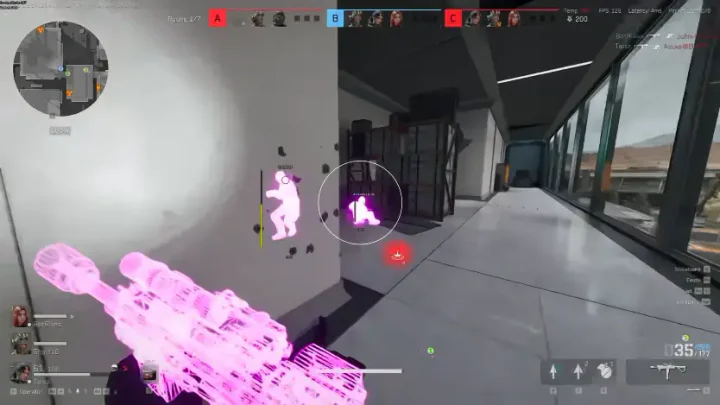
Real Delta Force matches with the live menu: player ESP, loot filters, and chams in raid fights. Swipe or use the arrows to browse.
1 / 5
What you are buying, what the label covers, and where to read next.
One menu, both prices
Aimbot, player ESP, loot ESP, chams, and misc are in the same build. Monthly is fine for a first run. Lifetime is the best deal if you keep playing past a few months.
Only what is listed
If a switch is not named on this page, it is not in the menu. The feature pages explain each one.
Check Status first
GREEN means you can load. RED means wait. A patch can change the label even if your key is still valid.
DMA requirement
The product page lists cloud DMA as required for full functionality. Plan hardware before you buy.
The Status page is the current label. The purchase card shows the same label.
Open Status pageGREEN
Current build is listed under GREEN.
What the label is not
GREEN is not a promise the light stays GREEN after the next patch, and it says nothing about your account. The buyer's guide covers the risk of using cheats.
Five modules on one menu: aimbot, player ESP, loot ESP, chams, and misc. Open a module page for sections, FAQs, and control detail.
All features comparedSet FOV, smooth, speed, and stickiness, filter targets, pick a bone, and use two keybinds. Optional FOV circle and target line.
Skeleton, boxes, health, names, weapons, helmet and armor readouts, hero name, distance, and custom ESP colors.
Item name, rarity, price, minimum price filter, player corpses, AI corpses, and computers.
Enable chams on player, AI, weapon, hands, or self with static or RGB color styles.
Camera FOV, third person, weapon and arm scale, crosshair, combat mode hide, encryption bypass, and configs.
Monthly and lifetime include all 50 published controls. Tap a name to jump to that control on the module page.
FOV, Smooth, Speed, Stickiness, Aimbot Filter, Bone Selection, 2 Aimbot Keybinds, Visible Check, Ignore Knocked, Draw FOV, Draw Target Line
Skeleton, Head Circle, Box, Distance, Name, Team Number, Weapon, View Direction, Health Bar, Snaplines, Show Knocked, Helmet Name, Helmet Level, Armor Name, Armor Level, Chest Bag Name, Chest Bag Level, Hero Name, Max Distance, Custom Colors / ESP Size / Transparency / Brightness
Item Name, Rarity, Price, Minimum Price Filter, Players Corpses, AI Corpses, Computers
Applies To Player / AI / Weapon / Hands / Self, Enable, Style (Static Color / RGB Color), Static Color Picker
Camera FOV Changer, Third Person View (Hotkey), Arms Scale Offset (X / Y / Z), Weapon Scale Offset (X / Y / Z), Enable Crosshair, Combat Mode Hide Entities, Encryption Bypass, Config System
Match the line before you pay. Lifetime does not widen the list.
Published requirements
Listed as supported
Not on the requirements line
Same full menu on both plans. Monthly is a fair way to prove the loader on your PC. Lifetime is the better buy if you keep playing: five monthly renewals are $175, and you stop paying after one $150 checkout.
Five months at $35 each is $175. Lifetime is $150 once.
Try monthly
$35
31 days. Good way to test the loader on your PC.
Best deal
Best deal
$150
One payment. Best deal if you play regularly.
Checkout is digital. The delivery note has the loader. The menu opens with Insert unless the note says otherwise.
Fresh install threadOpen the Status page before you pay and again before you load. GREEN means the current build is listed for load. RED means wait.
Windows 10 or 11, Intel or AMD, with HVCI, Core Isolation, TPM, and Secure Boot on. Cloud DMA is required for full functionality.
Monthly is $35 for 31 days and is a solid first step if the loader is new on your PC. Lifetime is $150 once. If you keep playing, lifetime beats paying $35 every 31 days.
Pay on checkout. The delivery note goes to your order email with loader access. The menu opens with Insert unless that note lists a different key. Only use the file from your own order.
Game open, label on GREEN, one load, then open the menu with the key from the delivery note. The setup guide covers the order. The troubleshooting guide comes before support if something fails.
What to send support
The troubleshooting guide covers delivery, loader, and menu problems in order. Support wants the checklist above.
Refunds and risk
A missing delivery or a long RED window during your license can qualify on the Refunds page. Bans and gameplay outcomes do not. The Terms of Use and the buyer's guide state the anti-cheat risk in plain words.
Feature pages, guides, and blog posts that go deeper than this checkout page.
What the published menu includes, cloud DMA and Windows requirements, and what to check after a game update.
Delta Force cheats on this site are a Windows menu with aimbot, player ESP, loot ESP, chams, and misc options such as camera FOV, crosshair, combat mode hide, encryption bypass, and a config system, as listed on the product page.
The published list includes aimbot controls (FOV, smooth, speed, stickiness, filters, bone selection, keybinds, visible check, ignore knocked, draw helpers), player ESP labels, loot ESP, chams, and misc options. Check the product and feature pages for the current control list.
Yes. The aimbot section includes FOV, smooth, speed, stickiness, aimbot filter, bone selection, two keybinds, visible check, ignore knocked, draw FOV, and draw target line.
Chams apply colored shading to player, AI, weapon, hands, or self with static or RGB styles and a static color picker.
Follow the published requirements, Status label, and setup threads. Cloud DMA is required for full functionality.
Game updates can change compatibility. Check the Status page for GREEN or RED before you load after a patch.